

Bloomberg Tax (also known as BNA) is a tax research and workflow platform for corporate tax teams, accounting firms, and international tax professionals. It offers primary sources, practitioner analysis, tax news, and AI-powered tools for research, calculations, compliance, and planning. It’s part of Bloomberg Industry Group, founded as The Bureau of National Affairs in 1929 and acquired by Bloomberg in 2011.
If you’re reviewing Bloomberg Tax because of rising subscription costs or slow research workflows, it may be time to reconsider whether it’s still the right fit and explore a better alternative for your team.
Below, we’ve reviewed some of the best Bloomberg Tax alternatives in 2026 to help you find a platform that better fits your team’s budget and research workflow. These tools fall into three main categories and are designed for different needs:
- AI-powered tax research solutions like Blue J, Checkpoint Edge with CoCounsel Tax, and CCH AnswerConnect
- Tax return preparation software like Intuit Lacerte Tax and ONESOURCE
- Transaction tax compliance/automation tools like Avalara, Tax Jar, and Intuit ProConnect Tax
Note: All vendor information is true as of August 2026 and should be verified independently.
8 best Bloomberg Tax alternatives at a glance
1. Blue J
Category: AI-powered tax research solution
Best for: Sole practitioners, local, regional, and national firms.
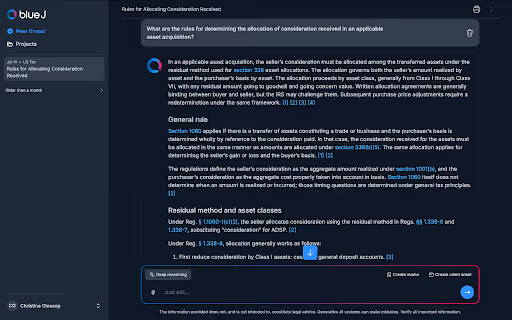
Blue J is an AI-powered tax research solution built specifically for tax professionals.
It handles the tedious parts of tax research, including finding the right information and verifying its authority. Instead of constructing Boolean searches and piecing together information from multiple results manually, Blue J lets you take the conversational tax research approach by asking tax questions in plain language and receiving an answer backed by sources.
Aside from its tax research capabilities, Blue J is designed around the broader tax research workflow, not just finding an answer. This means you can move from a question to a sourced answer, open the underlying authority, and dig deeper into individual sources. You can also upload relevant client documents and turn completed research into client-facing deliverables.
For teams evaluating different tax research platforms, this broader workflow helps explain why Blue J may be worth considering. Below, we break down the core features and how they support you and your team’s tax research process.
Key features
- Tax research: ask tax questions in plain language and receive synthesized answers with inline citations and a list of supporting sources. When new questions emerge, you can continue with follow-up questions and add additional sources. No need to start your research again.
- Source analysis and verification: review the authority supporting an answer by opening the underlying source. You can also use Ask a Document to ask questions about an individual case, ruling, regulation, or other tax document, making it easier to investigate lengthy or complex source material.
- Drafting and tax writing: turn your research into ready-to-review client deliverables, including tax memos, client emails, presentations, and other tax communications. Blue J can also help draft responses to IRS notices and adapt research into communications for clients, reviewers, or tax authorities.
- Client document analysis: upload client documents such as tax returns, operating agreements, notices, and other relevant files and use them alongside your tax research. This helps you investigate how the law applies to the specific facts and circumstances before you, rather than researching the issue in isolation.
- Compliance research: research and validate your client's or organization's tax positions that arise during compliance work while tracing the analysis back to supporting authority. Blue J supports research across areas such as filing positions, nexus, apportionment, state tax rules, depreciation and asset classification, and international tax issues.
- Advisory research: get up to speed on unfamiliar tax issues, explore potential planning approaches, identify additional information you may need from a client, and verify the authority behind your analysis before applying professional judgment.
How does Blue J support source verification?
Blue J is powered by primary authoritative content, exclusive Tax Notes commentary, and IBFD to provide answers that include inline citations and source lists. The solution lets you open sources, review relevant sections, request additional sources, and investigate an individual source further.
Blue J’s resource database is curated and updated daily, meaning you spend less time jumping between different primary tax materials sources just to determine whether something new has been published.
Pricing
Blue J has two major pricing plans:
- Individual plan: $1,498 per user per year, designed for sole practitioners. It includes full US federal, state, and local tax (SALT) coverage, unlimited questions, drafting and file uploads, inline citations and source lists, and SOC 2 Type II compliance.
- Team plan: contact Blue J for pricing. It includes everything in the Individual plan plus dedicated customer support, guided onboarding and training, firm-wide usage insights, SSO, and custom access controls.
Blue J also offers a 7-day free trial with no credit card required.
Want to see Blue J in action? Sign up for a free trial.
2. Checkpoint Edge with CoCounsel Tax
Category: AI-powered tax research solution
Best for: Accounting firms and tax departments that want authoritative tax research alongside conversational AI, drafting, firm knowledge, and repeatable workflows.
Checkpoint Edge is Thomson Reuters’ tax and accounting research platform, while CoCounsel Tax adds AI-assisted research and workflow capabilities on top of that content. Together, they let tax professionals search authoritative research in plain language, review cited sources, and use the findings in broader tax workflows.
How does Checkpoint Edge with CoCounsel Tax support source verification?
Checkpoint Edge with CoCounsel Tax support draws on Checkpoint’s content library. This library includes primary law such as the IRC, Treasury Regulations, IRS rulings, and court decisions; over 12 million expert-authored analysis pieces; and Checkpoint Catalyst's transaction-specific business tax research.
Key features
- Advisory Maps: provide step-by-step guidance and implementation aids for specific tax planning and advisory engagements.
- AI algorithm: uses AI-powered search to return targeted results from full-phrasal, natural-language questions.
- Concept markers: let you select related concepts and re-sort your results to include those concepts.
- State charts: provide multistate tax comparison charts with one-click access to primary law and editorial explanations.
Pricing
Contact a Thomson Reuters representative for pricing.
3. CCH AnswerConnect
Category: AI-powered tax research solution
Best for: Tax firms, accounting and audit professionals, and corporations.
CCH AnswerConnect is Wolters Kluwer’s tax and accounting research platform for professionals who need reliable answers without spending as much time digging through sources. It brings together expert-authored federal, state, and international tax content with Expert AI and offers accounting and audit research for firms that need broader coverage.
How does CCH AnswerConnect support source verification?
CCH AnswerConnect combines primary tax authority, including laws, regulations, and rulings, with proprietary analysis from the CCH editorial team. The platform uses Expert AI to draw on an expert-vetted research library and provides citations and links to supporting source documents.
Key features
For tax:
- AI search backed by expert content: provides answers supported by expert-vetted research and up-to-date tax guidance.
- Analyze your clients' documents with confidence: lets you upload tax returns, agreements, and other client files and ask questions about the fact patterns they contain.
- Time-saving tools: provides expert-backed insights that reflect recent changes and give you a more comprehensive view of the relevant information.
- Integration across ecosystems: integrates with CCH Axcess Tax, CCH ProSystem fx Tax, ATX, and TaxWise to connect research, preparation, and workflow tools.
For accounting and audit:
- Access the full CCH® Accounting Research Manager® content library: provides the content previously available in CCH Accounting Research Manager, along with curated materials and interpretive guidance.
- ARM topics A–Z: organizes important accounting research areas into curated topics covering accounting standards, engagement standards, and SEC practice content.
- Interpretive guidance: provides plain-language explanations of complicated accounting standards and regulations from the Wolters Kluwer editorial team.
For corporations:
- Turn regulatory complexity into a competitive advantage: supports tax research and compliance across federal, state, and international jurisdictions to help corporations identify incentives, control costs, and make business-planning decisions.
- AI-powered guidance: Verified answers in seconds: generates custom responses with links to verified source documents, citations, and drill-downs.
- Analyze your tax documents with confidence: analyzes uploaded returns, agreements, financial statements, notices, and other tax materials using citation-backed research.
- Industry spotlight: Manufacturing: provides manufacturing-specific guidance for navigating compliance requirements and identifying exemptions and incentives.
Pricing
There are four tiers of pricing plans available:
- CCH AnswerConnect Tax package, which starts at $1,499.
- CCH AnswerConnect Tax & Accounting (price not included)
- CCH AnswerConnect Global Tax (price not included)
- Federal, state & international (contact for pricing)
You can also get a 7-day free trial.
4. TaxJar
Category: Transaction tax compliance/automation solution
Best for: New businesses, marketplace sellers, and small and mid-size businesses that need real-time calculations and multistate reporting and filing.
TaxJar is a sales tax compliance platform from Stripe designed for businesses that need a more scalable way to manage US sales tax obligations. It is aimed at companies selling across multiple states and channels that want to reduce the manual effort required to stay compliant as their sales footprint grows.
This platform also offers integrations with e-commerce software like Amazon, Shopify, and Woo, plus a flexible API for custom solutions.
Key features
- Connect your e-commerce or ERP platform: integrates with existing e-commerce and ERP systems.
- Determine economic nexus: the Nexus Insights Dashboard and notifications help businesses monitor their state-level sales tax responsibilities.
- Collect accurate sales tax at checkout: real-time sales tax calculations based on location.
- Access sales tax reports: compiles e-commerce orders into a single dashboard, featuring all transactions, state-by-state reports with detailed breakdowns, and taxability reporting for reduced and exempt items.
- File and remit automatically: TaxJar’s AutoFile turns your e-commerce or ERP data into accurate, automated submissions.
Pricing
TaxJar has two plans, which are:
- Starter plan: starts at $39 per month
- Professional plan: starts at $99 per month
There’s also a 30-day free trial that doesn’t require a credit card.
5. Intuit Lacerte Tax
Category: Tax return preparation solution
Best for: Firms of all sizes that need professional tax-preparation software.
Lacerte is tax-preparation software designed to support individual and business returns, tax calculations, diagnostics, planning, document collection, and related firm workflows. It allows you to automate calculations and diagnostics, along with tools for managing K-1s, tax planning, and electronic signatures. Together, these features help firms handle more of the return preparation process in one place.
This platform has a built-in document management system that allows you to store, categorize, and access documents in a centralized system.
Key features
- Tax planning and reports: Intuit Tax Advisor helps practitioners develop tax-planning strategies and generate client-friendly reports that can be customized with a firm’s logo and colors.
- Workflow optimization: Lacerte includes automated K-1 functionality that reduces the need to manually transfer K-1 data.
- Client communications: Intuit Sign lets preparers add electronic-signature fields to supported forms and documents.
- E-file efficiency: Lacerte provides electronic-filing tools designed to reduce preventable e-file rejections.
- Support: Intuit provides Lacerte users with product support, training, and educational resources.
Pricing
Lacerte Tax offers two pricing tiers:
- Pay-per-return pricing, which starts at $599 per year.
- Custom plan: contact representatives for pricing.
6. Intuit ProConnect Tax
Category: Transaction tax compliance/automation solution
Best for: Sole practitioners and small firms, growing practices, and high-volume firms that want to prepare returns through a cloud-based platform.
Intuit ProConnect Tax is cloud-based tax preparation software built for tax and accounting firms. Using this platform allows you to bring return preparation, client data, and workflow tools together in one place, with integrations such as QuickBooks and the Intuit Accountant Suite to help firms keep their tax work more connected.
Key features
- Work from anywhere with cloud-based tax software: access ProConnect Tax online anytime, so you can prepare returns without installing software.
- Manage returns with built-in workflows: assign, track, and prepare returns in one place.
- Create tax plans with Intuit Tax Advisor: turn return data into client tax plans and identify tax-saving opportunities.
- Prepare a wide range of tax returns: file common return types from a centralized platform.
- Collect signatures with Intuit Sign: send, track, and receive electronic signatures as part of your tax preparation workflow.
- Import client data from QuickBooks: bring financial data directly into returns to reduce manual data entry.
- Access IRS transcripts without leaving ProConnect Tax: request and review client IRS transcripts directly within the software.
Pricing
Intuit ProConnect Tax has a few pricing options:
- Annual bundles: Start at $2,478 per year for 50 individual returns and go up to $8,462 per year for 400 individual returns.
- Pay-per-return: $82.46 per individual return and $97.48 per business return.
- Prepaid pricing: Discounted rates are available when purchasing 50 individual returns or more upfront.
- Business returns: Cost extra with annual bundles.
- Custom pricing: Available for firms with higher return volumes or different team requirements.
- User Access: $210 per user, or $2,100 flat for 10+ users.
7. Avalara
Category: Transaction tax compliance/automation solution
Best for: Businesses and accounting firms that want to automate transaction-tax compliance across multiple jurisdictions.
Avalara is a cloud-based tax compliance platform that helps businesses manage tax requirements across sales, purchasing, and international operations. This platform offers solutions like tax calculations, returns, exemption certificates, VAT, e-invoicing, cross-border compliance, property tax, and business licensing. These products work together to integrate tax calculation, filing, and compliance document management into a single platform.
Key features
Sales compliance:
- Avalara Exemption Certificate Management
- Avalara AvaTax
- Avalara Returns
- VAT Reporting
- Avalara E-Invoicing and Live Reporting
Purchase compliance:
- Avalara Exemption Certificate Management
- Avalara Vendor Exemption Management
- Avalara AvaTax for Accounts Payable
- Avalara Returns
- Avalara E-Invoicing and Live Reporting
Pricing
Avalara offers a variety of pricing options:
- Core Compliance: $799 per state, per year for businesses with less than $50 million in annual revenue.
- Core Compliance + SST Services: $699 per state, per year for qualifying businesses with less than $50 million in annual revenue.
- Custom pricing: Available for businesses with $50 million or more in annual revenue, multiple entities, or more complex compliance needs.
- Other services: Sales Tax Registration is $403 per location, while License Guidance starts at $119.
8. ONESOURCE
Category: Tax return preparation solution
Best for: Small businesses to multinational enterprises looking to simplify their tax, trade, and financial reporting workflows.
ONESOURCE is Thomson Reuters’ corporate tax software platform for automating tax, trade, and financial reporting processes. It brings together solutions for direct and indirect tax, global trade, reporting, and data management, allowing organizations to manage more of their tax lifecycle within a single product ecosystem.
Key features
- Automated indirect tax calculations: ONESOURCE Determination automates calculations for sales and use tax, GST, VAT, and excise tax.
- Global e-invoicing compliance: ONESOURCE Pagero helps businesses manage global e-invoicing compliance by centralizing tax data and automating reporting.
- Tax data reconciliation: ONESOURCE Reconciliations compares e-invoice and VAT/GST return data, identifies discrepancies, and brings together information from ERP systems and other sources.
- Automated indirect tax compliance: supports the preparation, validation, reconciliation, and filing of sales tax, VAT, GST, and other indirect tax obligations.
- Connected indirect tax workflows: connects source data, automates repetitive compliance tasks, and supports review-ready indirect tax workflows.
Pricing
Contact Thomson Reuters sales to get a custom quote.
What to look for in a Bloomberg Tax alternative
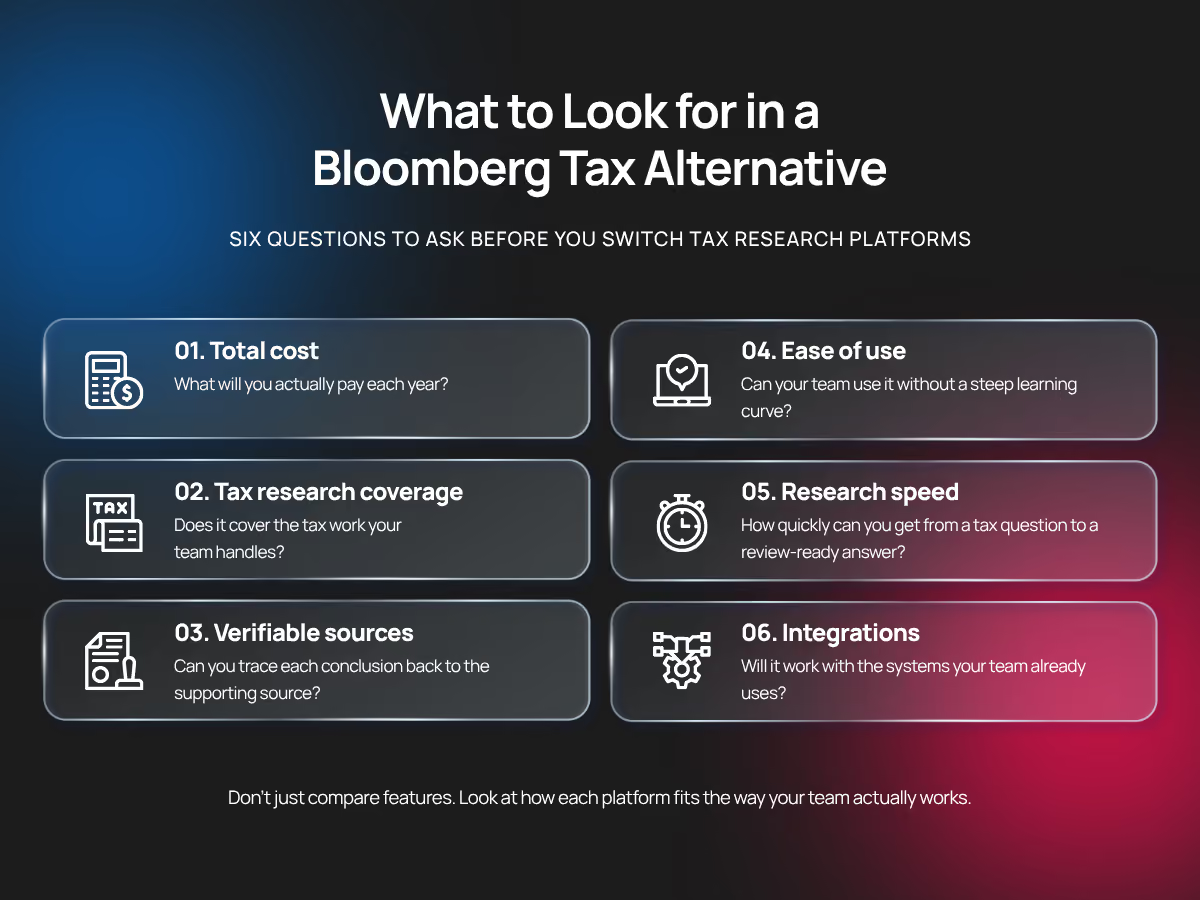
When considering your next Bloomberg Tax alternative, here are some factors you should be looking out for:
1. Total cost
According to the Tax Function Benchmark 2025 study by PwC, 66% of tax executives expect their budgets to be insufficient over the next one to three years. So when working with a limited budget, you need to be sure you're getting the best value for money.
Start with what the platform will cost you each year. Is pricing per seat or firmwide? Are AI features, additional content, implementation, training, or enterprise controls included in your subscription, or will you pay extra for them?
After reviewing the cost, you should closely examine your team's usage. If only a small part of your team regularly uses the platform, you may be paying for more access than you need.
2. Tax research coverage
Make sure the platform covers the work your team actually handles.
That might include federal, state, and local tax (SALT), international, corporate, partnership, or individual tax. But don’t stop at checking whether those categories appear on a feature page; look at the depth of the coverage, too.
Can you access the primary authority you rely on? Is expert analysis available when you need additional context? How quickly does new legislation, guidance, and case law appear?
The best way to find out is to test the platform with real questions from your practice, especially the difficult ones.
3. Ease of use
Don’t judge usability from the vendor demo alone. Instead, make sure to test the platform or give team members who will use it access.
A good Bloomberg alternative should let you pose a research question without extensive training and allow partners to review the authority behind a conclusion. If frustrations with the legacy tax research tool’s user experience are part of why you’re considering a switch, test whether the AI-powered tools you're considering remove friction points such as time-consuming searches and difficult navigation.
Also consider how much training and change management the switch will require. According to AICPA & CIMA’s Future-Ready Finance: Technology, Productivity, and Skills Survey in 2025, 50% of finance leaders cited skills and talent as their biggest obstacle to adopting new technology.
4. Research speed
Don’t measure speed by how quickly the platform produces a search result or AI answer. Instead, measure how long it takes you to go from question to review-ready conclusion.
That includes identifying the appropriate authority, verifying sources, conducting the analysis, addressing follow-up questions, and preparing the final output.
5. Integrations
Consider where the platform fits within your broader tax technology stack. For example, does it work with the document management, tax compliance, collaboration, identity management, and other systems your team already uses? Can information move between those systems easily?
A new platform shouldn’t save you time during research only to create more copying, downloading, uploading, or manual data entry later. If AI is integrated, also look at security, permissions, data retention, and how client or company information is handled.
6. Verifiable sources
Finally, check whether you can move easily from an answer to the underlying statutes, regulations, rulings, cases, and other authority supporting it. If you’re evaluating an AI-powered platform, pay particular attention to how citations work.
Make sure you can see exactly what supports the conclusion. Your tax research tool should allow you to open the relevant source and review it yourself. This way, you, your manager, or partner can validate your work without repeating the research.
Get faster, defensible tax answers with Blue J
Tax research solutions can become complicated and frustrating, especially when you’re not using a tool that streamlines the process. If your current workflow still requires practitioners to jump between search results, lengthy sources, and separate drafting tools, then it might be time to reconsider your tax research tool.
Blue J is specifically designed to make the tax research process seamless. Just ask Blue J your tax question in plain language and get instant, defensible answers grounded in primary authority, Tax Notes, and IBFD content. Every answer includes inline citations and source lists, so you can open the underlying authority and verify the conclusion yourself.
You can also continue your research with follow-up questions, dig deeper into individual sources, and turn completed research into client-facing emails, memos, and other deliverables without starting over in another tool. And with an Individual plan priced at $1,498 per user per year, you have an upfront cost.
Using Blue J for tax helps you spend less time searching and more time on the judgment, review, and client work that matters most as the future of tax research continues to evolve.
Frequently asked questions about Bloomberg alternatives
Traditional vs. AI-native tax research platform: which one is better?
Traditional platforms are built around searching large research libraries, while AI-native solutions let you ask questions in a conversational way and synthesize relevant authority.
Unlike traditional tax research platforms, generative AI in tax research allows you to do tax research in a conversational way. You can ask tax questions in plain language and get a reply with verifiable sources. This makes it easier to use than legacy tax research platforms.
How can I evaluate whether a new tax research platform is worth the investment?
Test it with real questions your team has already researched. Compare the time required to find authority, verify sources, reach a conclusion, and prepare review-ready work. Then weigh those gains against licensing, implementation, training, and other costs rather than comparing subscription prices alone.
Which tax research tool is best for mid-sized accounting firms?
There isn’t one best platform for every mid-sized firm. Start with your practice mix, research volume, budget, and the jurisdictions you cover. Then compare source quality, verification, usability, drafting capabilities, and the platform's ease of supporting both occasional researchers and practitioners who use it every day.
Can I switch tax research platforms without disrupting my team’s workflow?
Yes, but plan the transition around how your team currently researches. Identify heavily used content, saved research, integrations, and existing workflows first. Then test the replacement with a smaller group, provide training where needed, and confirm that practitioners can complete their normal research work before rolling it out more broadly.

Stay up to date







.webp)
