

The IRS can spot the mismatch and still get the tax result wrong.
A notice may correctly identify omitted income, for example, while the proposed liability leaves out basis, deductible expenses, credits, or other return items that change what the client actually owes.
So, confirming the discrepancy is only the starting point. You need to determine what happened, what was reported, and whether the proposed adjustment reflects the full tax picture.
That means comparing the notice with the filed return, client records, and relevant third-party reporting. From there, you can determine what is factual, what requires tax analysis, and whether the client should agree, disagree, or agree in part.
This guide walks through that professional workflow step by step, from classifying the notice and verifying the facts through research, drafting, review, submission, and follow-up. A worked CP2000 example then shows how the process plays out in practice.
Common IRS notices and what they signal
Each IRS notice tells you something different about what the IRS is questioning and where the client stands procedurally. Some flag a reporting mismatch. Others ask for documentation, demand payment, advance collection activity, or place the client at a point where formal protest or appeal rights come into play. The IRS’s notice guidance provides broader context.
CP2000: proposed adjustment for an information-reporting mismatch
A CP2000 generally means information reported to the IRS, such as a Form W-2 or 1099, doesn’t match the filed return.
This notice means the IRS is proposing an adjustment rather than issuing a final determination. Its CP2000 guidance explains that the taxpayer should review the proposed changes and respond by the date stated on the notice.
So if you get this notice from a client, as a practitioner, your job is to:
- reconcile the mismatch against the return and client records
- determine the client’s position
- identify any documentation needed to support that position
We’ll discuss responding to a CP2000 with a worked example later.
CP14: balance due after the IRS processes a return
A CP14 is a balance-due notice. The IRS generally sends it when its records show that tax, penalties, interest, or some combination of the three remains unpaid after processing the return.
That balance can arise for several reasons. The taxpayer may have filed without paying the full amount due. A payment may have been applied incorrectly or not yet reflected on the account, or the IRS may have added penalties and interest.
The notice typically shows the amount owed, the tax year involved, and the date by which the balance should be addressed.
As a practitioner resolving a CP14 for a client, start by confirming whether the balance is correct. Compare the notice with the filed return, payment confirmations, estimated-tax records, extension payments, and other relevant account information.
Payment history deserves close review because IRS notices can sometimes reflect missing or incorrect payment information, misapplied payments, or a balance that has already been paid.
So checking the client’s account and payment records can determine whether the CP14 reflects an unpaid liability or a payment-posting issue.
Once the balance is verified, ask two questions: does the client agree with the amount, and if so, how will it be paid?
If the amount is wrong, address the discrepancy. If it is correct, the next step may be payment in full or a payment arrangement, depending on the client’s circumstances.
CP501, CP503, and CP504: collection reminders and escalation
CP501, CP503, and CP504 are collection notices the IRS generally sends when a balance remains unpaid after earlier billing. They're all collection reminders but sit at different points in the collection sequence.
A CP501 is generally a reminder that the taxpayer still owes a balance after the IRS hasn’t received payment or a response to an earlier notice. A CP503 is a further reminder issued when the balance remains unresolved. By the time the IRS issues a CP504, the matter has moved to a more serious collection stage. The CP504 is a Notice of Intent to Levy and warns that the IRS may take collection action if the balance isn’t addressed.
As a practitioner resolving one of these notices for a client, first identify exactly which notice was received and confirm that the underlying balance is correct. Review the account history, prior notices, payments, penalties, and interest before deciding how to respond.
Then review the deadline, payment options, and any collection or appeal rights stated in the notice. If the client disputes the balance, address the underlying account issue. If the balance is correct, the next step may involve payment in full or a collection alternative.
A CP504 requires particular attention because it signals that the collection process has advanced. Review the IRS’s CP504 collection guidance and any applicable appeal notices before deciding whether the client should dispute the liability, resolve payment, or respond to the collection action.
Letter 3219: statutory notice of deficiency
Letter 3219 is a statutory notice of deficiency. The IRS generally issues it after proposing additional tax, and the taxpayer has not resolved or agreed with that proposed adjustment through earlier examination or correspondence.
The notice tells the taxpayer that the IRS has determined a deficiency for a specific tax year. It also sets out the amount in dispute and the deadline for petitioning the Tax Court. Missing the deadline may affect the client’s ability to challenge the deficiency in court before assessment.
Letter 3219 can, sometimes, be confused with a balance-due notice such as CP14. Both may show an amount the IRS says is owed, but they reflect different stages of the process. A CP14 generally concerns an assessed balance that remains unpaid. Letter 3219 addresses a deficiency the taxpayer can still challenge.
As a practitioner resolving Letter 3219 for a client, start by confirming the proposed deficiency, tax year, unresolved issues, and petition deadline. The Taxpayer Advocate Service’s Letter 3219 guidance explains the notice and the taxpayer’s opportunity to petition the Tax Court.
From there, determine whether the client intends to continue disputing the deficiency and which procedural options remain available. The immediate priority is preserving the client’s rights while you continue reviewing the underlying tax position.
Examination and documentation requests
Some IRS correspondence asks the taxpayer to substantiate items reported on a return rather than respond to an automated mismatch or unpaid balance.
In this case, you’d have to determine which records the IRS requested, and compare the request with the filed return and supporting workpapers.
Gather only the documentation needed to address the stated issues. Also record the response deadline and any procedural rights included with the correspondence.
Once you know what kind of notice you’re dealing with and what it requires, the next step is to work through the response in a consistent order.
How to respond to an IRS notice in seven steps

Responding to an IRS notice follows a sequence. You first understand the correspondence, then establish the facts, define the client’s position, research the authority, and prepare the response.
Use this seven-step IRS notice triage checklist to keep the workflow clear:
- Read and classify the notice: identify the notice type, tax year, issue raised, amount involved, and procedural position.
- Record the deadline and response instructions: note the exact response date, permitted response method, and any stated procedural rights.
- Verify the issue against the return and client records: determine whether the IRS’s factual premise matches the underlying records.
- Decide whether the client agrees, disagrees, or agrees in part: define the position the response supports.
- Research the tax authority supporting the position: identify authority that applies to your client’s facts, tax year, and disputed issue.
- Draft and review the response with supporting documents: explain the position, support it with evidence and authority where needed, and state the requested action.
- Submit the response correctly and track what happens next: follow the notice instructions, preserve proof of submission, and monitor subsequent correspondence.
This workflow for responding to IRS correspondence gives you the full path at a glance. The sections below expand each step.
1. Read and classify the IRS notice
Extract the information you need from the notice itself.
Pay attention to things like:
- Notice or letter number: identifies the correspondence you’re handling.
- Taxpayer: confirms the client and account involved.
- Tax year: identifies the return period under review.
- Notice date: helps establish the response timeline.
- Issue raised: identifies the item the IRS is questioning.
- Proposed adjustment: shows what the IRS wants to change, if anything.
- Amount involved: captures the tax, penalty, interest, or balance at issue.
- Requested action: tells you what the IRS expects the taxpayer to do.
- Response deadline: sets the external due date.
- Response method: identifies the permitted submission channel.
- Procedural rights: records any protest, appeal, or review rights stated in the notice.
Classifying the notice determines your next step. The IRS’s guidance on understanding your notice recommends reviewing the specific correspondence carefully and following its instructions. Its broader guidance on IRS notices reinforces the same point.
Classification in this early stage also tells you which deadlines and procedural rights need immediate attention. A routine information request doesn’t carry the same consequences as a notice that opens a protest or appeal window. The IRS’s guidance on appeal opportunity notices helps identify when those rights come into play.
By the end of this step, you should know what the IRS is asking, what deadline applies, and what needs to be verified next.
2. Record the deadline and response method
Start with the response date printed on the notice. Record it immediately, then schedule your firm’s review and approval to happen before that IRS deadline.
The date on the notice should guide your timeline unless a separate statutory or procedural deadline applies.
At the same time, confirm exactly how the IRS expects the response to be submitted:
- Response deadline: record the exact date stated on the notice.
- Internal review date: set an earlier firm deadline for factual review, research, drafting, and approval.
- Mailing address: use the address shown on the notice.
- Fax instructions: confirm whether fax submission is permitted.
- Online response: verify whether the matter can be handled through an IRS online channel or the Document Upload Tool.
- Representative authorization: confirm whether Form 2848 or another authorization is needed before acting for the client. The IRS explains the available power of attorney options.
- Extension availability: check the specific notice before assuming more time can be requested.
- Proof of submission: preserve evidence showing when and how the response was sent.
The IRS’s guidance on understanding your notice makes it clear how to follow the response date and submission instructions stated in the notice.
For your firm, that means planning the review, client follow-up, and approval early enough to avoid a last-minute response. That becomes especially useful during tax season, when competing deadlines can make a procedural miss easier.
3. Verify what the IRS says against the return and client records
Once the procedural details are under control, determine whether the IRS’s factual premise is correct.
A disciplined tax research process starts with a defined fact pattern because authority is only useful if it applies to the client’s actual circumstances. So when an IRS notice reflects what the agency believes happened, verify the notice against your client’s records.
Compare the notice against:
- Filed return: confirm how the item was originally reported.
- Schedules and forms: trace the disputed item to the supporting return detail.
- Client books and records: determine what the underlying records show.
- Information returns: compare Forms W-2, 1099, K-1, and other third-party reporting.
- Corrected forms: check whether a payer later issued revised information.
- IRS transcripts: use them where appropriate to confirm information reported to the IRS.
- Prior correspondence: review earlier communications that may affect the issue.
- Supporting documents: gather records that establish the relevant facts.
Then ask the questions that can change the proposed result:
- Did the client actually receive the income or transaction?
- Was the item already reported elsewhere on the return?
- Was the payer’s information return incorrect?
- Is the IRS working from gross proceeds rather than taxable income?
- Is basis missing?
- Were deductible expenses omitted from the proposed adjustment?
- Is the remaining issue factual, legal, or both?
This is especially important with a CP2000 notice where the IRS may correctly identify a reporting mismatch while still proposing the wrong tax result if basis, expenses, or other return items haven’t been taken into account.
4. Decide whether the client agrees, disagrees, or agrees in part
Professional notice work isn’t always binary. The client may accept one part of the IRS adjustment while disputing another.
If the client agrees
Agreement still requires review.
Confirm:
- IRS calculation: verify the proposed or assessed amount.
- Penalties and interest: confirm the amounts and treatment shown.
- Required response: follow the instructions stated in the notice.
- Payment: address payment or a payment arrangement separately where applicable.
If the client disagrees
Break the disagreement into specific factual and legal issues.
- Disputed facts: identify each point the client contests.
- Evidence: gather records supporting the client’s position.
- Legal issues: identify where authority is needed.
- Explanation: prepare a clear account of why the proposed adjustment should change.
That gives the later response a precise position to defend.
If the client agrees in part
Partial agreement means the client accepts part of the IRS adjustment but disputes the rest.
For example, the client may agree that gross receipts were omitted but disagree with the proposed liability because basis, deductible expenses, credits, or other return items change the result.
The response should clearly state what the client accepts and what remains disputed.
5. Research the authority behind your response
Once you know exactly what remains in dispute, research the authority that applies to that issue.
Start with primary authority, then use secondary sources to add context, interpretation, and help locate additional support. Our guide to federal tax research explains that process in more detail.
The sources you need will depend on the issue and can include:
- Internal Revenue Code: identify the statutory rule governing the issue.
- Treasury Regulations: determine how the statute is interpreted and applied.
- IRS administrative guidance: review relevant rulings, procedures, notices, and other published guidance.
- Court decisions: identify judicial authority when interpretation is disputed.
- Procedural authority: confirm rules governing protests, appeals, deadlines, or collections where relevant.
- Secondary analysis: use authoritative commentary to understand the issue and locate additional primary authority.
While finding the relevant authority, you can also confirm the source actually supports the position you plan to take.
With Blue J, you can review cited answers and open the underlying sources behind the analysis. That makes it easier to inspect the authority in context, compare it with the client’s facts, and decide whether it belongs in the response.
Different tax research sources carry different levels of authority, so each source should be weighed based on what it is being used to support.
Check whether the authority actually applies
The authority you found needs to be vetted before you rely on it. During this process, you should check:
- Tax year: confirm the authority applies to the period under review.
- Jurisdiction: determine whether the authority is controlling, persuasive, or inapplicable.
- Effective date: verify that the rule was in effect for the relevant year.
- Exceptions: identify limitations that could change the result.
- Contrary authority: look for sources that cut against the client’s position.
- Factual fit: confirm that the source addresses sufficiently similar facts.
Our detailed comparison guide to the best tax research websites gives you an arsenal of resources for research.
Your judgment still determines whether the authority applies and how much weight it carries.
6. Draft the IRS response around the issue the IRS raised
With the facts and authority settled, draft the response so an IRS reviewer can quickly understand the position.
A strong IRS response letter should make the following clear:
- Notice being answered: identify the notice or letter number.
- Taxpayer and tax year: state the client and period involved.
- Client position: say whether the taxpayer agrees, disagrees, or agrees in part.
- Relevant facts: include the facts needed to understand the issue.
- Disputed issue: define what remains in question.
- Explanation: connect the facts to the client’s position.
- Supporting authority: cite authority where legal support is needed.
- Attached evidence: identify the supporting documents included.
- Requested IRS action: tell the IRS what correction or action the client is requesting.
Blue J’s tax writing capabilities can support this stage by helping you move from reviewed research and client context into a structured draft.
IRS notice response letter outline
Use this structure as a reusable starting point:
- Taxpayer name and identifying information: connect the response to the taxpayer.
- Notice number: identify the IRS correspondence.
- Tax year: state the period involved.
- Notice date: include the date shown on the notice.
- Opening statement: state what the response addresses.
- Client position: specify agreement, disagreement, or partial agreement.
- Relevant facts: summarize the facts needed to understand the issue.
- Disputed item: explain the adjustment being challenged.
- Supporting authority: cite applicable authority where appropriate.
- Supporting documents: identify the evidence included.
- Requested IRS action: state what you want the IRS to change or reconsider.
- Representative information: include contact, signature, and authorization details where required.
Requirements vary by notice, so follow the response instructions on the actual correspondence.
7. Review the response before it leaves the firm
Final reviews will help you spot the minimum errors that may attack the integrity of your response and make you look unprofessional.
Treat your final review with both editorial and substantive lenses. The evaluation should test whether the response is factually accurate, legally supportable, and procedurally complete.
You should check:
- Facts: confirm the narrative against source records.
- Calculations: verify tax, penalty, interest, basis, income, and adjustment figures.
- Authority: confirm the cited law supports the stated position.
- Applicability: check the tax year, jurisdiction, and factual fit.
- Citations: verify that each citation points to the intended source.
- Attachments: confirm referenced documents are included and labeled.
- Requested IRS action: make sure the requested outcome is explicit.
- Deadline: confirm timely submission.
- Response method: verify that the chosen submission method is permitted.
- Signature: confirm required signatures are present.
- Authorization: check whether Form 2848 or another authorization is needed.
Then look beyond the immediate notice:
- Other tax years: determine whether the same issue appears elsewhere.
- Amended returns: consider whether another filing needs correction.
- State filings: assess whether the federal issue affects a state return.
- Penalties: consider whether the position changes penalty exposure.
- Related entities: identify consequences for connected taxpayers or entities.
AI tax research tools can speed final review by reducing time spent retracing the research trail, reopening sources, and checking where each conclusion came from.
Blue J supports that process with inline citations that link back to the underlying authority, so you can inspect the cited passage, assess the type and strength of the source, and confirm whether it applies to your client’s facts.
Worked example: how to respond to a CP2000 notice
Consider a client who receives a CP2000 because a Form 1099-NEC reported to the IRS doesn’t match the filed return.
Let’s assume the payer reported $40,000 of nonemployee compensation, while the return reported none of that amount. The CP2000 proposes additional tax, penalties, and interest based on the discrepancy.
The mismatch occurred because the IRS received a Form 1099-NEC showing $40,000 of nonemployee compensation, but the filed return shows $0 from that payer.
From the notice, we can establish the following facts:
- IRS-reported amount: $40,000
- Return-reported amount: $0 from that payer
- Payer: the business that issued the Form 1099-NEC
- Information return: Form 1099-NEC
- Proposed difference: $40,000
- Tax year: the year identified on the CP2000
- Proposed liability: the additional tax, penalties, and interest stated on the notice
At this stage, we know why the CP2000 was issued. What we don’t know yet is whether the IRS’s proposed liability reflects the correct tax result.
Step 1. Record the CP2000 response deadline and instructions
Next, we record the response date shown on the CP2000 and use that date to plan the rest of the work.
We also confirm how the IRS allows us to respond, including any mailing address, fax instructions, or online upload option stated on the notice.
At the firm level, we schedule the review and approval early enough to complete the response before the IRS deadline and confirm whether representative authorization is required.
If the issue later moves into an Appeals protest, a separate 30-day deadline may apply. This procedural deadline should be treated differently from the response date shown on the CP2000.
Step 2. Reconcile the mismatch against the return and client records
After speaking with the client, we confirm that the $40,000 was received. However, the client also explains that related business expenses weren’t reflected in the IRS’s proposed calculation.
We then review the return and supporting records and identify $12,000 of substantiated deductible business expenses connected with that income.
So, while the reporting mismatch is real, the proposed liability may still be overstated. The next step is to determine whether the tax treatment of those expenses supports an adjustment to the IRS calculation.
Step 3. Decide whether the client agrees, disagrees, or agrees in part
This fact pattern produces a partial-agreement position.
The client agrees that the $40,000 of gross receipts was omitted. However, the client disputes the proposed tax because the IRS calculation doesn’t reflect the $12,000 of substantiated expenses.
So that distinction defines what the response needs to defend.
Step 4. Research the underlying tax treatment
Now that we know the factual issue, we can narrow the research to the tax treatment of the $12,000 in business expenses.
We first identify the authority governing whether those expenses are deductible for the relevant tax year. Then we test that authority against the client’s facts, including any limitations, exceptions, or requirements that could affect the result.
At this point, the research question is: do the documented expenses reduce the income used in the corrected tax calculation?
If the authority supports that treatment, we have the legal basis for asking the IRS to revise the proposed liability.
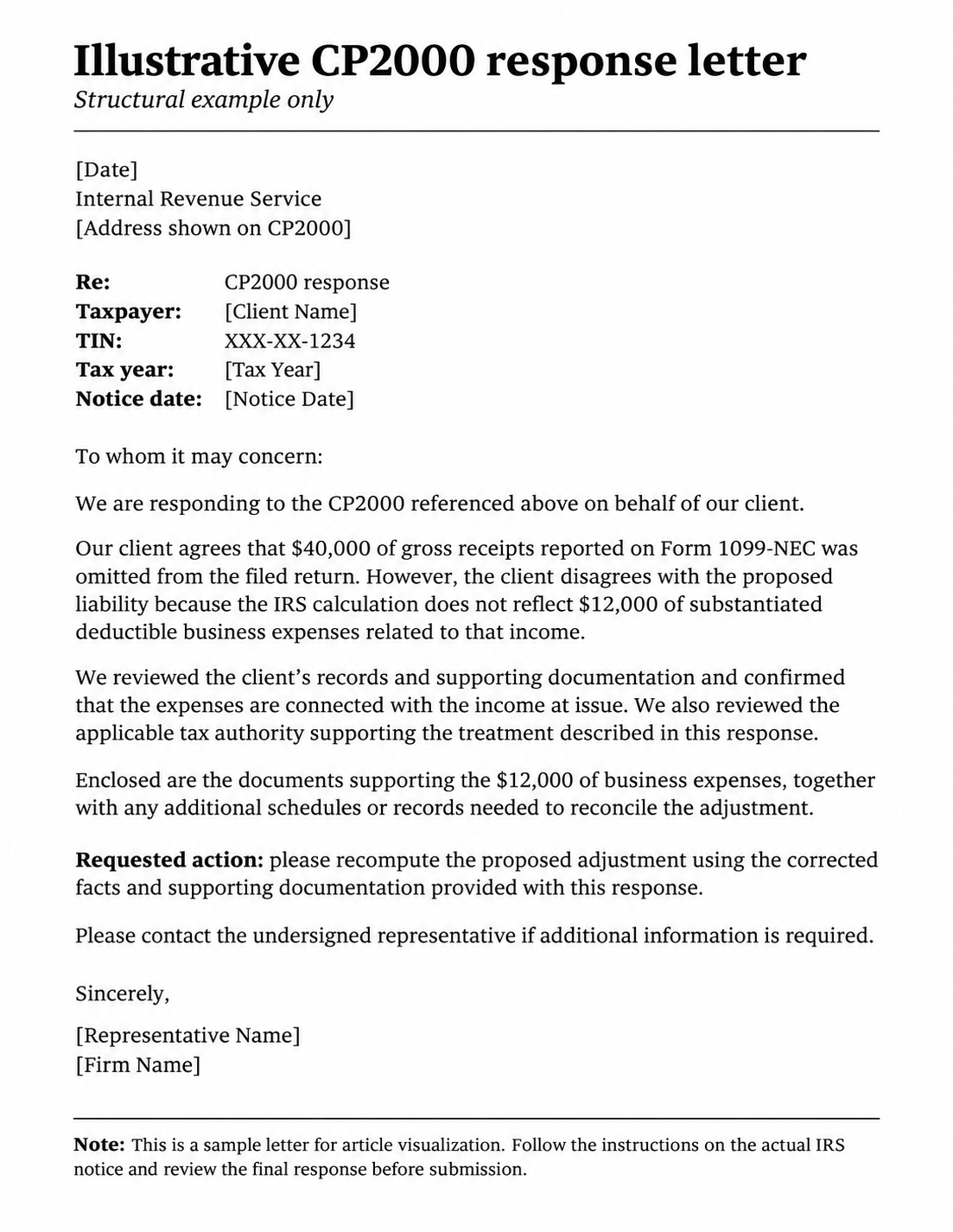
Step 5. Prepare the response and supporting package
Our response should identify the CP2000 and tax year, acknowledge the omitted gross receipts, explain the substantiated expenses, and show why the proposed liability should be revised.
Include supporting authority where appropriate and attach documentation substantiating the expenses.
Finally, state the requested action clearly. Recompute the adjustment using the corrected facts.
Step 6. Review and submit the response
Before we submit the response, we review the full package for accuracy and completeness.
We confirm the facts, calculations, authority, supporting documents, CP2000 details, deadline, submission method, signatures, requested IRS action, and any authorization requirements.
Once everything checks out, we submit the response using the permitted method, keep a complete copy, preserve proof of timely submission, and schedule follow-up for any further IRS correspondence.
What happens after you respond to the IRS?
Once the response is submitted, the case moves into follow-up. What happens next depends on the notice, the position you took, and how the IRS evaluates the response.
Possible outcomes include:
- IRS accepts the explanation: the issue may close without further adjustment.
- IRS revises the amount: the agency may accept part of the response and change the proposed calculation.
- IRS requests more information: additional documentation or clarification may be required.
- IRS sends further correspondence: another notice may establish the next procedural step.
- Disagreement continues: the case may move into administrative review or Appeals where available.
- The case progresses: some disputes may move toward deficiency, examination, or collection procedures.
With a CP2000, for example, the IRS may issue revised correspondence if the response resolves only part of the discrepancy. If the disagreement continues, deficiency procedures may follow.
Other notices can take a different path, so avoid assuming every case follows the same sequence. Collection notices, examinations, and penalty disputes each have their own procedural steps.
Keep tracking the case until the IRS confirms how it has resolved the response. If the issue becomes unusually complex, external tax research services can support the firm’s internal analysis and next steps.
How Blue J can help you review and respond to an IRS notice
Blue J fits into the same practitioner workflow, helping you move from the client’s notice to sourced research and then into a reviewed response draft.
As an AI-powered tax research solution, Blue J delivers defensible answers with sources practitioners can inspect and verify.
Upload the notice and identify the tax issue
You can upload an IRS notice and use it as client context.
Blue J can help identify the issue raised, relevant facts in the notice, questions requiring follow-up, and tax issues that may need deeper research.
That gives you a focused starting point without manually reconstructing the notice elsewhere.
Research the issue with the client context attached
With the notice attached, you can investigate the issue through conversational tax research.
Ask questions in plain language and refine the research while keeping the relevant client context connected to the analysis.
Inspect the authority behind the analysis
Blue J provides cited answers backed by primary authoritative content, along with exclusive content from Tax Notes and IBFD.
You can open the sources, inspect the authority behind the analysis, and decide whether it applies to the client’s facts.
Turn the reviewed research into a draft response
Once you’ve reviewed the facts and authority, Blue J’s tax-writing capability can turn that work into a structured IRS notice response draft.
That reduces re-entry of context and gives you a stronger starting point for the correspondence. You still verify the facts, confirm the authority, adapt the language for the tax authority, and approve the final response before submission.
Frequently asked questions about responding to IRS notices
How long do you have to respond to an IRS notice?
There is no universal deadline for responding to an IRS notice. Check the date printed on the notice and confirm whether separate procedural or statutory deadlines apply.
Some rights depend on timely action, so calendar an internal review date before the IRS deadline to leave time for verification, research, drafting, and approval.
What documents should you include with an IRS notice response?
Include only documents that support the position you’re asking the IRS to accept.
Depending on the issue, that may include tax forms, corrected information returns, receipts, statements, schedules, basis records, or other client documentation. Follow the notice instructions, identify each attachment clearly, and retain a complete copy of the submission.
Do you need to amend your tax return after receiving a CP2000?
You don’t necessarily need to amend the return simply because you received a CP2000.
If the notice correctly identifies a discrepancy, the appropriate response depends on what caused it and whether other items also need correction. Follow the instructions on the CP2000 and determine whether an amended return is required for issues beyond the notice.
Can you request more time to respond to an IRS notice?
Sometimes, but the availability and procedure depend on the notice.
Don’t assume an extension is available. Check the correspondence and applicable IRS guidance, then request additional time through the permitted channel where the notice allows it.
Can AI help you prepare an IRS notice response?
Yes. Blue J’s AI-powered tax research solution can help you analyze an uploaded notice, research the underlying tax issue, inspect supporting authority, and turn reviewed research into a draft response through its tax writing capabilities.
You should still verify the client facts, confirm that the cited authority applies, and review the final response before submitting it to the IRS.

Stay up to date