
If you’re an accountant or you run an accounting firm, have you ever wondered: where can AI create more capacity in your accounting firm? Where does professional judgment still need to stay with the accountant?
AI can now take on more of the repetitive, high-volume work across bookkeeping, reconciliations, reporting, tax research, and internal workflows. That gives your team more time to review the results, investigate exceptions, and handle decisions that depend on context and professional judgment.
This article explores where AI fits across accounting workflows today, the tools best suited to each use case, the risks firms need to manage, and how to introduce AI into existing processes.
AI in accounting use cases and tools at a glance
Tax research and drafting
The legacy tool user experience for tax research often involves several steps. First, you’ll need to understand your client’s issues and what they’re trying to do.
From there, you turn your findings into research questions and build keywords or Boolean strings that combine terms using operators like AND, OR, and NOT to narrow or broaden results. Next, you manually work through your search results to identify the most relevant sources and authorities.
By using AI tax research software, you can shorten your research process. An AI-powered tax research solution like Blue J lets you ask tax questions in plain language and receive a citation-backed answer with sources you can open and review. That’s part of why Blue J takes a different approach to tax research.
Let’s say a client starts doing business in a new state and wants to understand its sales tax obligations. You can use Blue J to research the relevant nexus and filing rules, then check the applicable thresholds, exceptions, tax period, and client facts before reaching your conclusion.
Once you’re done researching, Blue J can also help with tax writing. It can turn your research into ready-to-review drafts of emails, memos, and presentations.
Where human input is needed
When you use AI for tax research and drafting, your role shifts more toward verification, applying professional judgment, and supporting compliance and advisory work.
An accountant still needs to review cited authorities and confirm that they’re current and relevant to the client’s tax issues. Check for exceptions or competing sources that could change the outcome of your research.
When it comes to drafting, some AI tax research software can turn completed research into a memo or email to clients or tax authorities based on your findings. You can then check whether the draft reflects the verified research and add any client-specific context it didn’t include.
Automate bookkeeping and transaction processing
Instead of reading each document and entering the details into accounting software manually, you can use AI to capture the information, suggest transaction categories, and prepare it for you to check.
AI-powered bookkeeping solutions like Dext and AutoEntry can extract data from receipts, invoices, and statements and prepare it for review. At the same time, AI built into accounting software like QuickBooks can suggest categories and match bank transactions to existing records directly within the accounting workflow.
Where human input is needed
As a bookkeeper, you still decide how to categorize, code, and treat transactions for tax and reporting purposes. When the software is unsure or gets something wrong, you need to review the source documents, correct the entry, and decide the appropriate treatment.
Streamline accounts payable and accounts receivable
AI can take some manual work out of accounts payable by reading invoices and capturing details like:
- The vendor name
- Invoice number
- Date
- Amount due
- Payment terms
- Purchase order number
You can also use AI to compare invoices with purchase orders, receipts, vendor records, previous invoices, and contracts, then flag discrepancies before payment.
On the receivables side, AI can help you track overdue invoices, schedule follow-ups, draft routine payment reminders, and surface open disputes that may need your attention.
A good example of AP/AR software is BILL. This software can extract and code invoice data, support two- and three-way matching, move bills through approval workflows, and flag unusual amounts or potential issues for review.
BILL also lets you create recurring invoices, track their status, send automated reminders, accept ACH and credit card payments, and set up auto-charge or auto-pay where appropriate.
Where human input is needed
You still need to review exceptions such as invoice mismatches, unusual amounts, incorrect coding, or missing information, then decide how to resolve them before payment. You also set process controls, including approval rules, permissions, and who can release funds.
An actual accountant needs to manage customer disputes like chargebacks or changes to payment terms.
Speed up reconciliations and month-end close
AI can handle some manual matching before you start your review. It can compare bank transactions, subledger activity, and general ledger entries using details like amounts, dates, references, descriptions, and transaction patterns. It can also flag anything that AI software can’t confidently match.
For example, if AI matches 4,940 of 5,000 bank transactions, you only need to manually investigate the remaining 60. A 2026 study of AI-enabled accounting using field data from 79 small and medium-sized businesses found that GenAI adoption was associated with an average 7.5-day reduction in monthly close lag.
A good example of an AI reconciliation solution is FloQast. This software can take more routine matching work off your team during reconciliation and close. Its AI Transaction Matching feature compares high-volume transactions across multiple data sources and flags unmatched items and discrepancies for investigation.
Where human input is needed
You’re still responsible for investigating exceptions. These can include unmatched transactions, unusual balances, or missing information. You also decide when a reconciliation is complete by reviewing supporting evidence, resolving outstanding items, and confirming the final balance before sign-off.
Analyze financial data and prepare reports
AI can help you compare actual results with your budget, forecast, or previous period and quickly see the biggest differences. It can then point you to the accounts or transactions behind those changes, so you know where to investigate further.
For example, if gross margin drops from 42% to 35%, AI can show which revenue lines or cost categories contributed most to the decline. You can then investigate whether higher supplier costs, heavier discounting, changes in product mix, or an accounting issue caused the drop.
AI can also speed up monthly reporting by highlighting the biggest changes in key metrics and drafting a summary of what changed. Your team can then review the analysis, add context, and explain what those changes mean for the client.
You can also use AI for forecasting and scenario planning. For example, you might model how slower customer payments, lower revenue, or higher supplier costs could affect future cash flow. You can then use those scenarios to talk clients through the possible impact and their options.
A good example of an AI financial analysis tool is Datarails, which lets you keep working in Excel while bringing together data from accounting, ERP, CRM, banking, and other systems. It can also support data consolidation, reporting, forecasting, and scenario analysis.
Datarails can also help identify variance drivers, trends, and anomalies, giving you a faster starting point for investigating changes and preparing financial commentary or reports.
Where human input is needed
You decide what the analysis should actually focus on based on the client’s situation. That could mean prioritizing certain KPIs, comparing a specific period, or setting thresholds for the changes that deserve a closer look.
Once AI flags a movement, you need to work out what’s behind it and whether the explanation holds up against the underlying data. You also decide which findings are meaningful enough to include in the final report and how to explain them to the client.
Forecasts and scenarios need the same judgment. You set the assumptions, challenge whether they’re realistic, and interpret what the different outcomes could mean for the business.
Document SOPs and staff training
Another great use case of AI in accounting is capturing the process knowledge that often sits with experienced employees and turning it into clear SOPs, checklists, and training materials.
For example, a senior accountant can talk through how they handle a bank reconciliation while AI records the steps and decisions they make. AI can then turn the walkthrough into a step-by-step draft procedure. Your team can review it, add the firm’s controls, note when to escalate an issue, and clarify who needs to review or approve each step.
AI-generated procedures can help junior accountants get up to speed faster. They can see how the firm handles common tasks, what to check, and when to escalate an issue instead of relying on a senior accountant for every step.
A good example of an AI-powered tool that falls in this category is Scribe. An experienced accountant can use Scribe to start a capture, complete a reconciliation, journal-entry process, or other routine workflow as usual, and Scribe automatically creates instructions with screenshots, text, and cursor clicks.
Where human input is needed
Your team still needs to decide what the right process looks like. An experienced accountant should review each AI-generated procedure and make sure it reflects how your firm actually wants the work done.
You also need to add the reasoning behind the steps. That means explaining why a check matters, what evidence staff should look for, what counts as an exception, and when they should stop and ask for help.
The same applies to training. A documented process can show junior staff what to do, but managers still need to teach the accounting judgment behind it and help them recognize when the standard process no longer fits the situation.
Automating internal accounting workflows
Automation can remove some manual handoffs from your accounting workflows. Instead of someone updating a tracker, sending a reminder, or moving information between systems, you can set a workflow to trigger the next step automatically when a specific event occurs.
For instance, using software like Zapier lets you connect tools such as QuickBooks Online, Xero, NetSuite, spreadsheets, email, and task-management software. You can then create workflows that send alerts, create tasks, or update records when something changes. Zapier also supports accounting workflows around reconciliations, close tasks, journal entries, and revenue processes.
Where human input is needed
You still set the rules for how the workflow runs. That includes what starts the automation, which systems it can access, what data it can move, and what actions it can take.
You also decide where automation should stop. If the system flags an exception or sends a task for review, your team still needs to investigate the issue and make the accounting decision.
How to choose the right AI tools for your accounting firm
Whether you’re replacing legacy accounting software or switching from one AI tool to another, the right choice depends on how well the software fits your firm’s workflow, data requirements, and review process.
Here are some of the main factors to consider when evaluating an AI tool for your accounting firm:

Start with the workflow
Start with a specific problem your firm wants to solve, then map how the work gets done today. Look at the systems your team uses, where work changes hands, what requires review, and which steps take the most time.
Doing this gives you a clear picture of where AI can make the biggest difference. Take tax research, for example: if your practitioners spend too much time finding relevant authority, look for an AI tax research solution that lets them ask questions in plain language and quickly surfaces relevant sources.
Match the tool to the work
Different workflows need different AI. General-purpose tools work well for drafting and summarization. At the same time, purpose-built accounting or tax solutions are better suited to work that depends on financial data, specialist context, or authoritative sources.
For example, if you’re choosing a tax research tool, assess the jurisdictions it covers, the sources it relies on, whether answers include citations, how easily practitioners can inspect the underlying authority, and whether it supports the research your team actually performs.
The question isn’t simply whether the AI can produce an answer. It’s whether your professionals can use and review that answer as part of real client work.
Test accuracy and traceability
Test the tool on work your firm already knows before trusting it with unfamiliar work. This gives you a much better view of performance than a vendor demo.
Build a test set that includes routine work, complex scenarios, and exceptions. Compare the output against work your team has already reviewed and approved. Look for incorrect conclusions, missing information, inconsistent outputs, and cases where the tool appears more certain than the evidence supports.
Review security and governance
Set the rules for AI use before sensitive client data enters the system. Your evaluation should cover both the vendor’s controls and the way your own firm intends to use the product.
Find out what data the tool accesses, where it’s processed and stored, how long it’s retained, and whether prompts, documents, or other customer data can be used to train models.
Assess integration with your tech stack
Evaluate how well the tool integrates with your accounting software, ERP, practice management system, document storage, spreadsheets, and other systems. A useful AI feature creates less value if staff still have to move data or manually rebuild context around it.
For an accounting firm, that could involve your ERP or general ledger, tax software, practice management system, document storage, spreadsheets, and client portal.
Decide whether to build, buy, or customize
Buy when an established solution already handles the workflow well. Customize when an existing tool is close to what you need but requires changes such as integrations, workflow rules, templates, or additional automation to fit how your firm works.
Consider building or extending an existing system when your firm has a genuinely distinctive process or proprietary data, but account for implementation, security, maintenance, integrations, governance, and long-term ownership, not just upfront cost.
Measure results after implementation
Decide how you’ll measure success before rolling the tool out. Track the metrics most closely tied to your firm's workflow. This can be time saved, turnaround time, error or rework rates, review effort, and how much additional client work your team can handle.
Compare those results with your baseline after implementation. If the tool is saving time but creating more review work or exceptions, the overall gain may be smaller than it first appears. Use the results to decide whether to expand usage, adjust the workflow, or stop using the tool.
Use AI to improve your tax research with Blue J
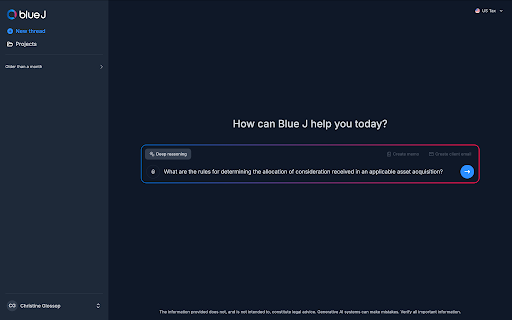
Legacy tax research often relies on keyword or Boolean searches followed by manually reviewing results and piecing together the relevant authority. AI-powered tax research offers a more conversational approach.
An AI tax research solution like Blue J is built to make tax research more conversational. You can ask your question in plain language and get instant, defensible answers grounded in primary authority, Tax Notes, and IBFD content. Each response includes inline citations and a source list, so you can open the supporting material and verify the answer yourself.
You can keep the research moving with follow-up questions, investigate individual sources in more detail, and use your completed research to draft client emails, memos, and other deliverables. That means you don't have to rebuild the work in a separate tool once you're done.
Blue J has two pricing options:
You can also try Blue J free for 7 days, with no credit card required.
Frequently asked questions about AI for Accountants and Accounting firms
Are accountants still in demand with AI?
AI is changing accountants' work, but demand for accountants and auditors is still projected to grow. The US Bureau of Labor Statistics expects employment to increase 5% from 2025 to 2035, with roughly 115,300 openings each year on average.
As AI handles more routine tasks like data entry and processing, accountants may spend more time analyzing financial information, reviewing complex issues, advising clients, and making decisions that require professional judgment.
How can AI help with tax research?
AI can shorten several steps in the tax research process. You can ask a tax question in plain language, use AI to identify and synthesize relevant authority, and continue the research with follow-up questions as new facts come up.
Blue J lets you ask federal tax research or SALT questions in plain language, review citation-backed answers and supporting sources, and then use the research to draft client emails, tax memos, presentations, and responses to tax authorities.
Can accountants use ChatGPT?
Accountants can use ChatGPT, but it’s better suited to general productivity tasks such as drafting emails, summarizing documents, organizing notes, or explaining concepts. For tax research, a purpose-built AI tax research solution is better suited to professional work because it can ground answers in curated tax content and give practitioners sources they can inspect and verify.
What are the most effective AI use cases in accounting?
AI is especially useful for the repetitive, data-heavy parts of accounting. You can use it to extract and categorize transaction data, process invoices, and match transactions during reconciliations.
It can also help with variance analysis, management reporting, tax research and drafting, process documentation, and routine workflow automation.

Stay up to date