

For decades, tax professionals have relied on legacy tax tools for research for good reason. They provide access to extensive libraries of tax authorities, expert analysis, and other trusted research materials.
However, the major challenge with these tax research tools is finding the right information quickly. Traditional research tools rely heavily on keywords and Boolean searches, which combine search terms using operators such as AND, OR, and NOT to narrow or broaden the results. Because tax guidance rarely sits in one location, doing tax research means you’ll need to sift through different documents to find the tax answers you’re looking for.
For busy tax teams, this approach to tax research is time-consuming. Large research databases can also be expensive, especially when pricing depends on users, content packages, modules, or enterprise access. It’s not uncommon for firms to pay for broad content libraries or workflow features that only a small percentage of the team regularly uses.
AI tax research tools are changing that experience. Instead of starting with a Boolean search, many platforms now let you start with the tax question itself and return a synthesized answer with supporting sources. This article compares seven of the best legacy tax research tool alternatives in 2026 and the key factors to consider when choosing one.
7 best AI tax research tools at a glance
Note: All vendor information is true as of August 2026 and should be verified independently.
1. Blue J
Best for: Sole practitioners, local, regional, and national firms that want fast, defensible answers with verifiable sources.
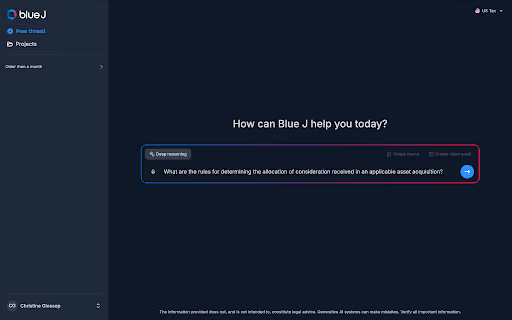
Blue J is an AI-powered tax research solution built specifically for tax practitioners.
This solution lets you conduct conversational tax research by asking your tax question in plain language. In return, Blue J delivers a defensible answer in seconds with sources you can review and verify.
Compared to legacy tax research tools that rely on Boolean searches and manual source review, Blue J lets you ask questions naturally, surface relevant authority faster, and spend less time piecing together an answer. This way, you can focus more on reviewing your analysis, applying your personal judgment, and doing advisory work.
Blue J was founded in 2015, and it has been used by thousands of organizations, including Big Four firms and Fortune 100 companies. The solution has answered more than 10 million tax questions to date and has a 75% adoption rate among monthly active users.
What sources does it use?
Blue J uses vertical AI trained on curated tax content maintained by a dedicated Legal Research Team. The solution references primary tax authorities, including statutes, regulations, cases, IRS guidance, treaties, and other government materials. Additionally, there’s also coverage for all 50 US states, including state and local tax (SALT).
Blue J also draws on secondary sources such as Tax Notes, a reputable portfolio of publications from Tax Analysts covering tax news, analysis, and expert commentary. And if you or your firm work on international or cross-border tax issues, IBFD content lives in Blue J, providing you with treaty analysis, country commentary, and international tax guidance across more than 220 jurisdictions.
How can you verify the answer?
Each Blue J answer includes inline citations and a source list showing the materials behind it. For primary sources, you can see the relevant excerpt, open the full document to check the surrounding context, and use “view more sources” to find related authority.
If you want to dig into one particular case, ruling, or other document, you can use Blue J’s Ask a Document to question that source directly.
Blue J curates and refreshes its resource database daily. This reduces the time you need to spend checking multiple primary tax sources for newly published material.
Key features
- Conversational tax research: ask complex tax questions in plain language.
- Inline citations and source lists: see which authorities support each answer.
- Source analysis: open the underlying authority, review relevant sections, and request additional sources.
- Ask a Document: dig deeper into an individual case, regulation, ruling, or other tax document.
- Client document analysis: research alongside uploaded returns, notices, agreements, and other files.
- Follow-up research: refine an issue without starting from scratch.
- Tax writing: turn research into memos, emails, presentations, and other client-ready work.
Pricing
Blue J offers two main pricing options:
- Individual plan: $1,498 per user annually, built for sole practitioners. The plan includes complete US federal, state, and local tax coverage, unlimited questions, drafting and file upload capabilities, inline citations and source lists, and SOC 2 Type II compliance.
- Team plan: pricing is available by contacting Blue J. It includes all Individual plan features, along with dedicated customer support, guided onboarding and training, firm-wide usage insights, SSO, and custom access controls.
Blue J also offers a 7-day free trial with no credit card required.
2. TaxGPT
Best for: Smaller tax firms that want AI research alongside document analysis, tax writing, client context, and broader workflow automation.
TaxGPT includes AI-powered tax research as part of a growing set of tools for other tax-practice workflows that could benefit smaller firms. With this solution, you can research federal, state, local, territorial, and treaty questions and receive citation-backed responses. Additionally, TaxGPT also has an AI Tax Preparation Agent that automates return preparation inside a firm’s existing tax software.
What sources does it use?
TaxGPT includes citations to sources, from IRS/CRA codes, Treasury Regulations, court cases, and administrative guidance, so you can verify every response with secondary sources based on web content.
How can you verify the answer?
Each TaxGPT research result includes citations to the supporting tax sources. The sources are shown alongside the answer, allowing practitioners to verify the information independently.
Key features
- AI Tax Research: lets you ask tax questions in a conversational tone.
- Citation-backed answers: conduct research and get answers supported by tax authorities.
- Document analysis: research using uploaded returns, notices, and financial documents.
- Tax Writer: draft memos, IRS responses, letters, and other tax communications.
- Tax Matrix: compare tax treatment across jurisdictions.
- Client Intelligence: maintain relevant client context.
- Agent Andrew: AI-assisted tax return review.
- TaxGPT Cowork: supports agentic workflows for tax and accounting.
Pricing
TaxGPT has three pricing options:
- Pro: contact for a custom quote.
- Pro Plus: contact for a custom quote.
- Enterprise: contact for a custom quote.
3. Bizora
Best for: Tax firms, CPA practices, and in-house teams that want AI tax research grounded in primary authority with transparent entry-level pricing.
Bizora is an AI-native tax research platform built around primary-source research. It supports US federal and state research alongside select international tax coverage. With this solution, you can ask tax questions in plain language and choose between different research modes.
You can also review the supporting authority and reasoning, analyze client documents, and turn completed research into memos or client communications.
What sources does it use?
Bizora’s documented sources include the Internal Revenue Code (IRC), Treasury Regulations, IRS Revenue Rulings and Revenue Procedures, Internal Revenue Bulletins, and IRS Chief Counsel materials. They also include Tax Court and Federal Circuit case law, treaties, state tax authority guidance, selected international tax codes, and OECD guidance.
How can you verify the answer?
Bizora links claims in its answers to specific primary authorities through citations and inline annotations. You can open the full authority text or the original source document.
For more complex research, View Steps shows the sources Bizora used and how it connected them when reaching its conclusion.
Key features
- Primary-source AI research: draws from the IRC, Treasury Regulations, IRS rulings, and case law.
- Automatic citations: answers link back to supporting tax authority.
- Deep Research: breaks more complex questions into multiple research steps.
- The Vault: analyze returns, K-1s, memos, engagement letters, and other documents.
- 50-state coverage: research US federal and state tax issues.
- International coverage: select treaty-partner countries plus OECD and EU VAT frameworks.
- QuickBooks and Xero integrations: bring financial data into the research workflow.
Pricing
Bizora offers three pricing options:
- Essential: $29.99/user/month
- Pro: $69.99/user/month
- Enterprise: $119.99/user/month
Bizora also offers a 7-day free trial.
4. CoCounsel Tax Research
Best for: Accounting firms and corporate tax departments that want AI-assisted research grounded in Thomson Reuters Checkpoint content.
CoCounsel Tax brings conversational AI and workflow features into Thomson Reuters’ established tax research ecosystem. Its Tax Research plan helps you move from a tax question to citation-backed analysis while staying connected to Checkpoint research.
Practitioners can ask complex tax questions in plain language rather than starting with a traditional Checkpoint search. CoCounsel Tax then returns answers grounded in Checkpoint content, the IRC, and government sources, with citations practitioners can review.
What sources does it use?
CoCounsel Tax Research sources information from Thomson Reuters Checkpoint content. This tax research solution provides the IRC, government web sources, and your own firm or personal documents. Additionally, it can surface relevant code sections, regulations, rulings, and guidance with citations back to Checkpoint and primary authority.
How can you verify the answer?
CoCounsel allows you to click a citation, which opens in the Citation Viewer. This lets you search within the document, review source information and metadata, expand the document, or download and print it.
Key features
- AI-powered tax research: conversational answers grounded in Checkpoint.
- Checkpoint Edge: access to Thomson Reuters’ underlying tax research platform.
- Multistate research: State Charts and research across state tax issues.
- Artifact creation: turn research into structured outputs.
- Knowledge Base: bring firm knowledge into CoCounsel.
- Shared Workspaces: organize research and collaborate with colleagues.
- Templates: standardize repeatable research workflows.
- Document analysis: work with tax returns, workpapers, and other documents.
Pricing
Contact Thomson Reuters for a quote.
5. CCH AnswerConnect
Best for: Tax firms that want AI-assisted research backed by Wolters Kluwer’s CCH editorial analysis and primary authority.
CCH AnswerConnect combines Expert AI with CCH’s established tax research library. The platform also supports federal and multistate research, document analysis, and source review. Its 360° View brings related primary authority, explanations, IRS materials, and practice resources together around a tax issue. This lets you move from an initial answer into deeper research without starting over.
What sources does it use?
CCH AnswerConnect combines primary tax authority with Wolters Kluwer's CCH research and analysis. Its tax library includes sources such as the IRC, regulations, rulings, and cases, as well as CCH expert analysis. The solution covers federal and multistate research, and international content.
How can you verify the answer?
CCH AnswerConnect generated responses include citations, links to verified source documents, and drill-downs. With the links provided, you can review the source material behind the answer.
Key features
- Expert AI research: AI-assisted answers grounded in CCH content.
- Primary authority: IRC, regulations, rulings, cases, and other tax materials.
- Expert analysis: CCH editorial guidance alongside primary sources.
- Client-document analysis: ask questions about uploaded returns, agreements, and other files.
- Research tools: SmartCharts, topic resources, tax news, and the US Master Tax Guide.
- CCH integrations: connects with CCH Axcess Tax, ProSystem fx Tax, ATX, and TaxWise.
Pricing
CCH AnswerConnect Tax offers four different pricing packages:
- CCH AnswerConnect Tax: starts at $1,499.
- CCH AnswerConnect Tax & Accounting: custom pricing.
- CCH AnswerConnect Global Tax: custom pricing.
- Federal, State, & International Tax: custom pricing.
6. Bloomberg Tax
Best for: Corporate tax departments and larger advisory firms handling complex federal, state, international, and transactional tax matters.
Bloomberg Tax combines an established tax research library with AI-assisted research. This solution has an AI Assistant that lets practitioners ask tax questions in a conversational way and receive answers grounded in Bloomberg Tax content. It also has Chart Builders, which lets you compare rules across jurisdictions when doing federal tax or SALT research.
What sources does it use?
Bloomberg Tax's AI draws on research content already available in the Bloomberg Tax library. This includes primary and secondary tax sources, Bloomberg Tax's Tax Management Portfolios, tax news, and expert analysis.
How can you verify the answer?
Bloomberg Tax AI-generated answers link directly to the source materials, allowing you to verify your findings.
Key features
- AI Assistant: conversational tax research.
- Primary authority: federal, state, and international tax sources.
- Tax Management Portfolios: detailed practitioner-written analysis.
- Expert analysis: Bloomberg Tax commentary and research.
- Chart builders and navigators: structured tools for complex tax questions.
- Tax news: current developments alongside research.
- Broader workflows: connections with other Bloomberg Tax products.
Pricing
Bloomberg offers two types of pricing:
- For smaller firms, Bloomberg Tax offers a Small CPA offering which starts at $2,200.
- A custom subscription with a custom quote for larger organizations.
7. Tolley+ with Protégé
Best for: US tax professionals who want AI-assisted research backed by LexisNexis tax content across federal, state, local, and international tax.
Tolley+ with Protégé is LexisNexis’ AI-powered tax research platform for US tax professionals. It combines more than 1,400 tax, accounting, and estate-practice sources with the Protégé AI assistant for conversational research, compliance research, multi-jurisdictional analysis, and issue spotting.
What sources does it use?
Tolley+ with Protégé brings together tax, accounting, and estate content covering federal, state, local, and international issues. LexisNexis specifically documents IRS guidance such as Private Letter Rulings, Technical Advice Memoranda, and Revenue Rulings, along with analysis built around key IRC provisions and its Comprehensive Tax Guides.
How can you verify the answer?
Tolley+ gives practitioners several ways to access the underlying research. For example, the Federal Code Reporter organizes relevant IRS guidance around IRC provisions, while Code Compare lets you compare different versions of a statute or regulation.
Search Trees show how search terms were applied and how the relationship between those terms affected the results. There are also Search Term Maps that help you see where your search terms appear, so you can refine the search further.
Key features
- Conversational tax research: Protégé Ask lets practitioners research complex tax questions in natural language.
- Comprehensive tax content: access more than 1,400 sources covering federal, state, local, and international tax, accounting, and estate topics.
- Federal Code Reporter: access IRS guidance such as Private Letter Rulings, Technical Advice Memoranda, and Revenue Rulings organized around IRC provisions.
- Comprehensive Tax Guides: more than 585 chapters covering federal income tax, estate and gift tax, international tax, and federal tax procedure.
- Statutory Analysis Checklists: break key IRC sections and subsections into more structured analysis.
- Code Compare: compare different versions of statutes and tax regulations.
- Search Trees and Search Term Maps: visualize how queries are interpreted and refine research results.
- Multi-jurisdictional research: research federal, state, local, and international issues within the same platform.
Pricing
Contact LexisNexis for a custom quote.
What to look for in an AI tax research tool
Today, many tax teams are already adopting AI-powered research. As shown in Blue J’s 2026 AI Tax Research Solution Outlook Report, AI adoption is on the rise across accounting workflows. Our research shows that 60% of firms have already adopted some form of AI, and 32% are planning to adopt.
In another PwC’s 2025 Global Reframing Tax Survey of 1,205 executives across 47 countries, 47% said leveraging new technology in the tax function is a top priority, while 56% reported already seeing tangible benefits from GenAI.
These findings show that AI is moving from experimentation to everyday tax work. As adoption continues to grow, firms need to know what to look for in an AI tax research solution.
Below, we’ve outlined some of the factors to look for when choosing generative AI in tax software to help you determine which solution fits your needs:
1. Tax research coverage
Make sure the tool covers the tax work your team actually handles. For many firms, that means strong federal and SALT coverage, with international, treaty, corporate, partnership, and individual tax research where relevant.
When picking an AI tax research tool, look out for the number of authoritative sources it covers and which states' tax laws it covers. You should also consider the types of expert analysis and historical materials, as well as how often the content is updated. If your firm does international tax research, you need to ensure the AI tax research tool you’re considering also covers international tax laws.
2. AI approach
Some AI models are designed specifically for tax research, while others are designed more for general use.
Although you can use general-purpose LLM tools to ask tax questions in a conversational way, they are not grounded in authoritative tax sources and don’t have a dedicated tax authority library.
On the other hand, AI-native tax research solutions are designed specifically for tax researchers. Typically, a great AI tax research software should let you ask questions in conversation and get answers backed by sources you can verify on your own. For instance, Blue J lets you ask your tax questions in plain language and, in return, get defensible answers with sources you can review and verify.
3. Source quality and verification
AI can speed up tax research, but it does not replace professional review. Direct access to the supporting authority helps you confirm that the source says what the answer claims, assess whether it applies to your facts, and decide whether the conclusion is strong enough to rely on.
A strong AI tax research tool should make it easy to check the authority behind every answer. You should be able to move from the response to the underlying source, review the relevant passage, and follow the research trail when you need more context.
4. Research depth
A good AI tax research tool should help your team work through fact-dependent questions. The answer may change based on the taxpayer’s circumstances, the applicable rules, the jurisdiction, or the tax year.
The tool should also surface the relevant authority during the research process. That way, your team can review the multiple sources before reaching a defensible conclusion.
5. Ease of use
When picking an AI tax research solution, make sure it’s simple to navigate and easy to work with. Your team should be able to ask follow-up questions, review supporting sources, upload client documents, and keep the research in one place.
It should also help you turn your research into work that’s ready for review. If you have to jump between tools or rebuild the analysis elsewhere, the process takes longer and creates more work for your team.
6. Research workflow
Tax research rarely follows a straight line. As you work through an issue, new questions may arise, client facts may change the analysis, and you may need to dig deeper into the supporting authority.
Look for a solution that keeps those steps connected. You should be able to ask follow-up questions, bring in client documents, review individual sources, and use your verified research to create a memo, email, or other deliverable. This saves you from restarting your research or piecing the work together across separate tools.
7. Security and client data
According to Future-Ready Finance: Technology, Productivity, and Skills Survey Report 2025, 47% cite safety and security concerns as a barrier to technology adoption. So when picking an AI tax research tool, review how the vendor protects uploaded returns, notices, agreements, and financial statements.
You should also check the tool’s encryption, access controls, data retention practices, SSO options, and, more importantly, confirm whether customer data is used to train its models.
8. Pricing
Look at how the vendor actually structures pricing, not just the number on the pricing page. Some vendors charge per user, while others charge per seat or at the firm level. For example, a per-user subscription might be cheaper if you're a sole practitioner but can quickly add up if more than 20 people need licenses.
Make sure to look out for what the subscription includes, too. Some vendors might place limits on certain core features and reserve them for higher-tier plans like enterprise or team.
Streamline your AI tax research with Blue J
The best alternative to a legacy tax research database is the one that covers your team’s work, provides reliable, verifiable sources, and reduces the manual effort required to reach a usable conclusion.
Blue J brings those parts of the research process together. You can ask complex tax questions in plain language and get defensible answers backed by primary tax authority and professional content from Tax Notes and IBFD. You can then open the supporting sources, dig deeper into individual authorities, and continue your research as new questions come up.
Instead of building multiple searches and piecing together information across documents, you can focus more of your attention on reviewing the authority, applying professional judgment, and turning the research into work your team or client can use.
Frequently asked questions about AI tax research tools
How accurate are AI tax research tools?
Accuracy varies by tool, source coverage, and the complexity of the question. Look for solutions that ground answers in authoritative tax sources and let you review the citations yourself rather than relying on the generated response alone.
Blue J, for instance, draws from primary tax authorities alongside professional sources such as Tax Notes and IBFD, and lets you open the cited sources to verify the authority supporting its answer.
How should I test an AI tax research tool?
You should test the AI tax research tool you’re considering with real questions your team already knows how to answer. This can include a few complex or fact-heavy issues. Compare the answer, cited authority, research depth, and how easily you can verify the conclusion.
What’s the difference between an AI tax research tool and a general AI chatbot?
General AI chatbots are built for broad tasks and are not inherently grounded in authoritative tax sources. AI-powered tax research tools like Blue J are built specifically for tax. They use tax-specific sources and citations, so practitioners can review the authority behind an answer before relying on it.
Can I use an AI tax research tool alongside my existing database?
Yes. You do not necessarily need to replace your existing tax research database when you adopt an AI research solution.
You can use the AI tool to ask questions in plain language, identify relevant authority, and get an initial synthesis of an issue. Your existing database can still be useful when you need specialized commentary, particular publications, or content that falls outside the AI tax research tool’s source coverage.

Stay up to date